Topic Information
Topic Information page allows you to view and modify the basic information of a topic. By storing and managing detailed information such as tags, team, manager, and description for each topic, you can clearly categorize the purpose and usage of topics and clarify management responsibilities.
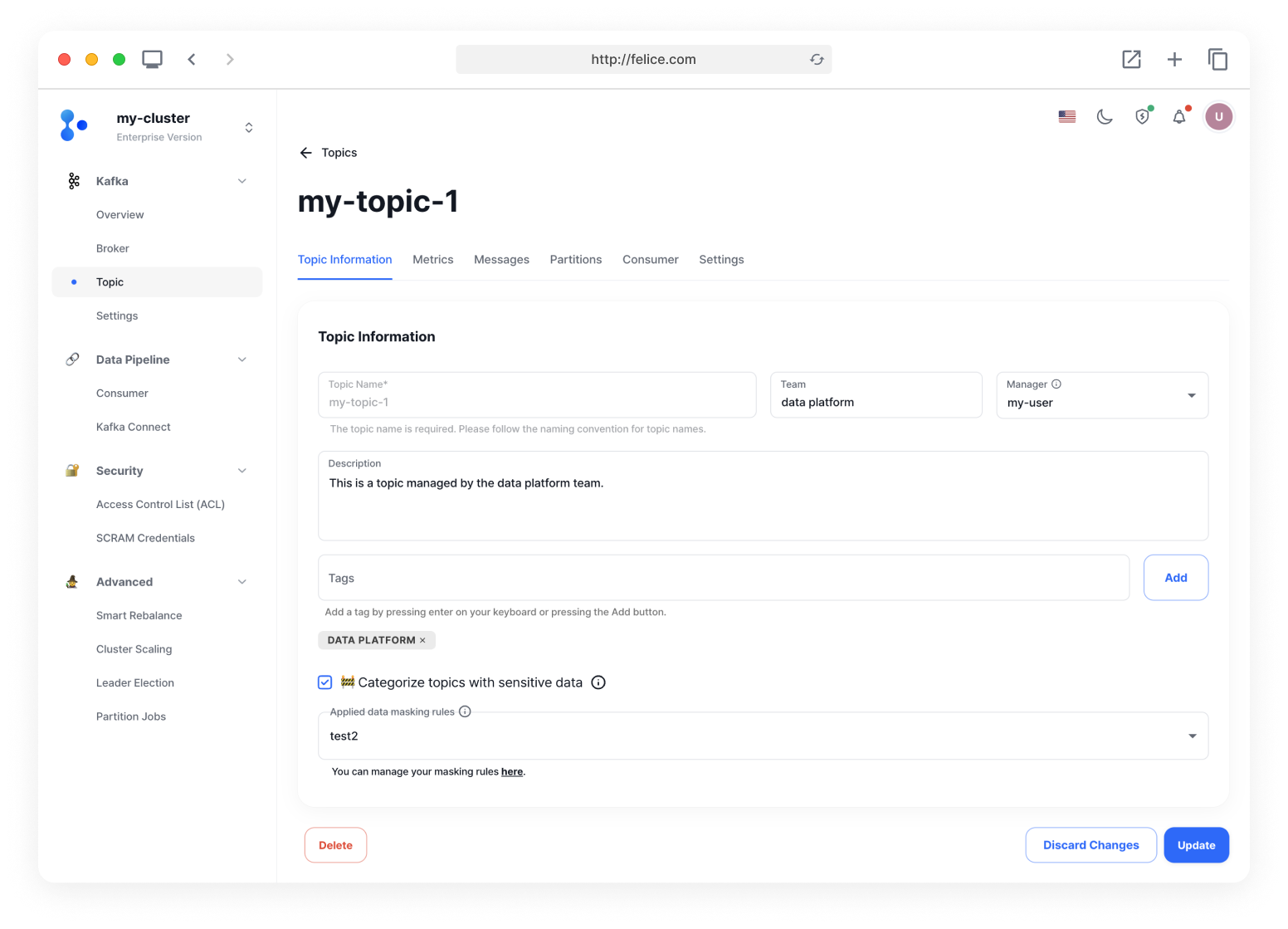
| Field | Description |
|---|---|
| ⓵ Topic Name | The name of the topic. Topic name cannot be modified |
| ⓶ Team | The team in charge of the topic |
| ⓷ Manager | The individual in charge of the topic |
| ⓸ Description | A description of the topic |
| ⓹ Tags | A list of tags representing the topic |
| ⓺ Categorizing as a Topic Containing Sensitive Data | When enabled, masking rules can be applied to the topic |
Categorizing as a Topic Containing Sensitive Data
If there is a possibility that the topic may include sensitive data, you can enable the [Categorize topics with sensitive data] checkbox to apply masking rules. For more details on masking rules, please refer to the Data Masking document.

Modifying Topic Information
After entering the changes you need in Topic Information, you can modify the topic information by clicking the [Update] button.
If you wish to revert the changes before finalizing the modification, you can click on the [Discard Changes] button to restore the previous contents.